So far, we've covered lottery odds analysis from official resale data, how many entries you need, and how to ask family members to help. Now we're finally getting to the main topic.
The first thing you need to do to apply is:The starting point for the ticket lottery = FIFA ID registration.
This article isdesigned so you can hand it directly to family or friends helping you, and they can just follow along(for the "just do this part!" use case).
- First-Time FIFA ID Registration Guide (Take your time, no rush!)
- For helpers: Just do "this part" first (5-10 minutes)
- Step 1: Go to the Registration Page
- Step 2: Enter Your Personal Information (Step 1/2)
- Step 3: Set Your Password (Step 2/2)
- Step 4: Check Your Email and Complete Pre-Registration
- Step 5: Go to the Ticket Page
- Step 6: Register Your Address to Complete Setup
- Next Article (Application Guide)
First-Time FIFA ID Registration Guide (Take your time, no rush!)
To apply for the World Cup 2026 ticket lottery, you first need a FIFA ID.(member account).
Once created, this becomes your gateway for everything from lottery applications to ticket management.
For helpers: Just do "this part" first (5-10 minutes)
- Create a FIFA ID (register with your email)
- Complete email verification
- Be ready to access the ticket page (finish address registration)
*The lottery application itself is covered in separate articles (pitch-side / goal-end guides).
Step 1: Go to the Registration Page
About browser settings: we recommend turning off auto-translate. When I had family help, leaving it ON caused some confusion.Of course,ONyou can still proceed with it on, butit is possible to complete the process,try to enter information inalphabet/Englishas much as possible- please keep that in mind..
Next, on your phone or PC,the FIFA official pageand go to that site.Tap the person icon (circle) in the top right and press "Sign Up"(or "Sign up") button.
Step 2: Enter Your Personal Information (Step 1/2)
On the next screen, fill in the fields from top to bottom.
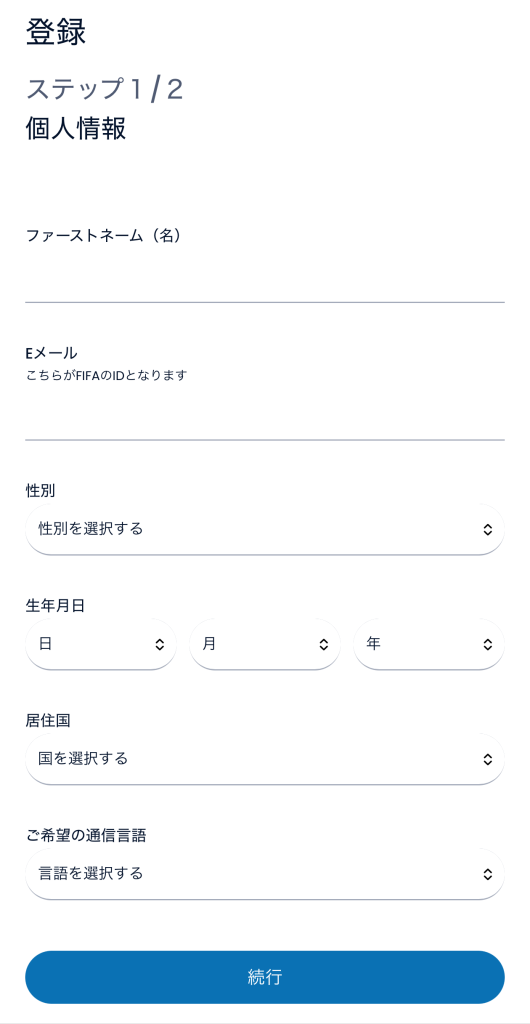
- First Name: Your given name (e.g., Taro)
- Email: Your regular email address (this becomes your FIFA ID)
- Gender / Date of Birth / Country of Residence / Language: Tap the field to select
- For language, Japanese is not available, so please select English for now.
Once you've entered everything, press "Continue" at the bottom of the screen.
Step 3: Set Your Password (Step 2/2)
Next, create your personal "key" (password).
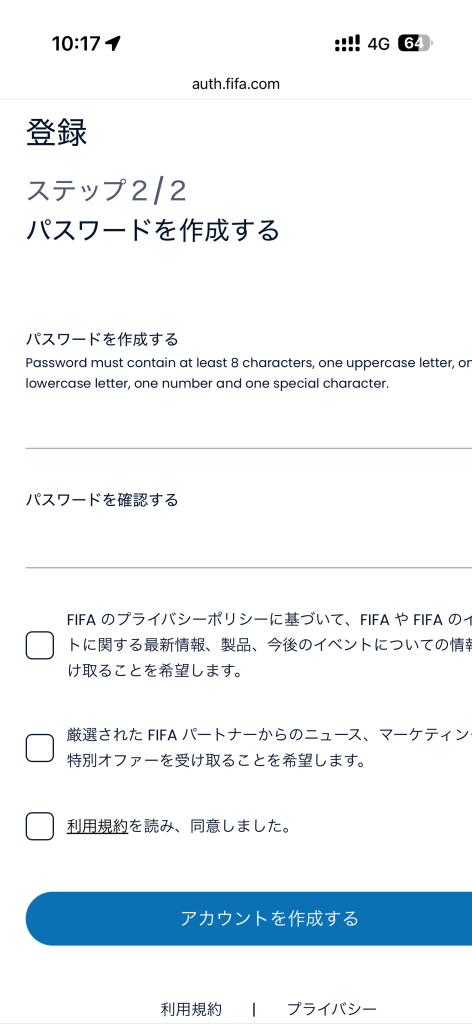
Password requirements (shown on screen):
- At least 8 characters
- Upper and lowercase letters
- Numbers
- Symbols (! ? # _ etc.)
Example:Soccer2026! / Fuji_3776A etc.
There are two input fields:
- Create Password: Your new password
- Confirm Password: Enter the same password again
There are three checkboxes:
- Top two: Newsletter subscription (no need to check these)
- ) Bottom one:Terms of Service agreement (this is the only required one)
Lastly, press "Create Account" at the bottom of the screen.
Step 4: Check Your Email and Complete Pre-Registration
You will receive an email from FIFA at the address you registered.The link expires after some time, so try to verify it quickly (within 5 minutes ideally).
- Check your inbox
- Look for the message from FIFA and tap on it
- Click the link (button) in the email
Pre-registration is now complete! Next, proceed to full registration so you can purchase tickets.
Step 5: Go to the Ticket Page
This is just pre-registration, so next, for full registration, go tothe ticket page.
When you see a card like the one below,"View Details" .
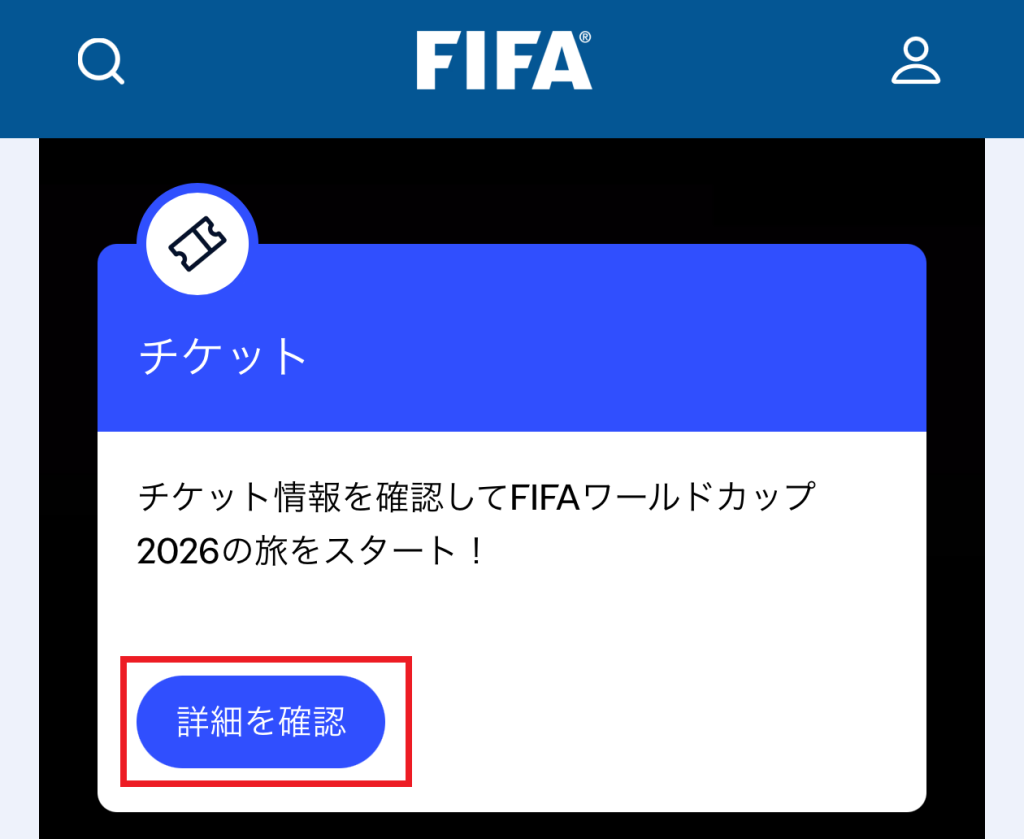
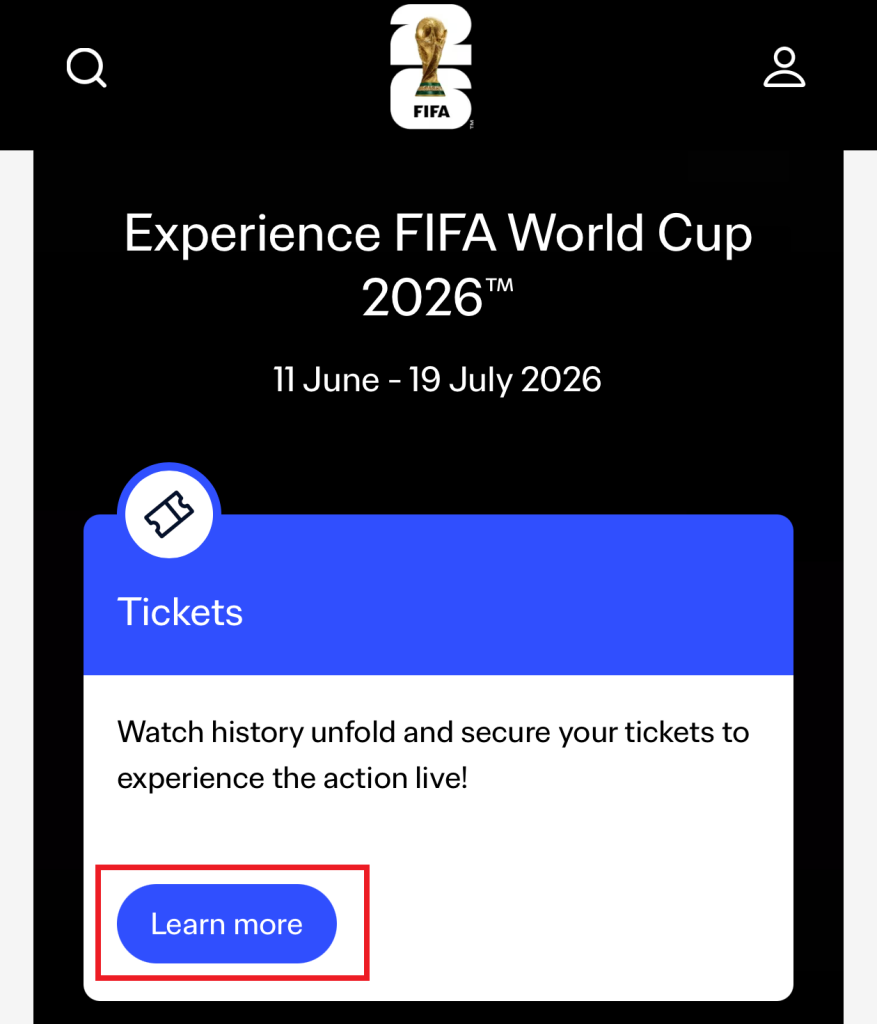
Here the screen will switch to English. Do not worry about that.
On the English screen, Learn more(or a similar button) appears, press it again.
Step 6: Register Your Address to Complete Setup
If you see this screen, you're almost there! It's in English, but the info you enter is just your regular address.
(Note: if auto-translate is ON, everything might show up in Japanese)
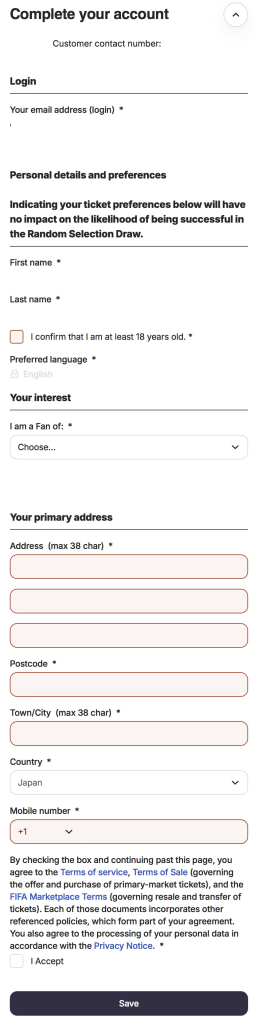
- "I confirm the..." checkboxThis confirms you are 18 or older. Please check it.
- Address: Street and number (e.g.,
1-1-1 Marunouchi)
*Use Line 2/3 for building name if needed - Postcode: Postal code (no hyphen needed)
- Town/City: City or ward name (e.g.,
Chiyoda-ku)The chances are low, but same household = same address could be flagged in the lottery. So if asking relatives or a spouse, consider using their family home address or another real address (if none is available, same address is still - Country: Japan
- Mobile number: Mobile phone number
- If the country code +1 is showing, switch it to Japan (+81) instead
- Remove the leading 0 from the Japanese number (e.g., 090-1234-5678 becomes 9012345678)
Lastly, Save." and you're all done! Great work!
Next Article (Application Guide)
Once you've finished this,you've cleared the gateway to enter the lottery.
Next up is the actual application. As a follow-up to this article, we have two guides:


Comments